
Basics
pfSense 2.9.0 on Proxmox
Installing pfSense 2.9.0 on Proxmox. An update for 2026. Including how to setup the GEMU Guest Agent. And Unbound 1.26.0 security issue fix for older installs.


Docker
Anyone using computers knows how important the DNS is. For a homelab we need more, things like blocking bad sites. Without a working DNS you are lost and nothing will work. Technitium is a DNS Server for Privacy and Security including site blocking and syncronication. We set it up using Docker.

MyNewLab
I took my old MacBook Pro (Intel) and upgraded it with a version of Arch Linux, Omarchy 4.0. It's beautiful, easy to use, and all based on Arch. It's also a system you will learn to love Omarchy 4.0.

Networking
Setting up a VM or a VPS is easy. But you need to make it secure, and that is hard. Here we discover 2 of the basic tools UFW and Fail2ban. This post is about setup, making it safe and secure and the results running for a day. This is the first step when setting up a new web facing VM or a VPS.

DNS
To use friendly names instead of IPs. Set up a Private Domain with Technitium. We set up a Domain Name Server ns1 and configure it to handle our domain, example.com or mylab.lan. Options for later: DHCP, a cluster with at least ns1 and ns2 for redundancy, and add ad-blocking if that's needed.

Security
SSH is the quintessential tool for server administration. But, most servers and VPS are installed with less than optimal settings for SSH. We don't want root to be able to log in, it's a security vulnerability. We don't want to allow the use of passwords for nobody to log in to our servers/VPS.

Build
One way to use Tailscale on Proxmox servers for remote access is to use a Proxmox CT (LXC) and it will be unprivileged for security reasons. Using one LXC we can reach all our devices on the remote site securely. Tailscale makes WireGuard mesh networking easy.
Tools
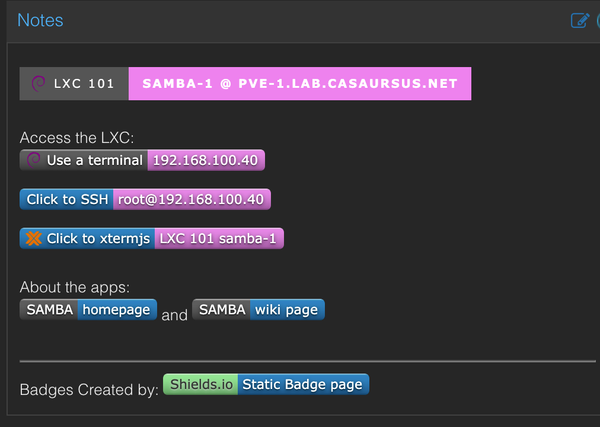
Attach a USB SSD or just a memory stick to a privileged LXC container on Proxmox, then install Samba in the container, and share the contents over the network. A network storage and more for SMB users. A fine place for ISOs and Cloud Images or family pictures or other media stuff.

Networking
Running Tailscale is really easy and you can use their Control Center. But, how about total autonomy and self-host the Tailscale Control Center on your own server or a VPS. It is possible, and this post is about setting it all up using Headscale.

Markdown is a text-to-HTML conversion tool for web writers. It allows you to write using an easy-to-read, easy-to-write plain text format, then convert it to structurally valid XHTML (or HTML). — John Gruber

Anyone who do remote work will have the need to start a remote machine at some point in their career. I'm using UpSnap in my Tailscale VM in Docker to perform WoL of some of the Servers. This VM is on an always on server and runs: Portainer, Tailscale and UpSnap.

If you want to show Copyright and other warning or display system information in the Login or Banner Page, you definitely can do it.

A Proxmox Template speeds up the deployment of VMs a lot. Especially if combined with Cloud Images and Cloud-Init. To speed up deployment is one of the goals with virtualization. Using templates is one of the best ways to deploy Docker and other containers using QEMU/KVM Virtual Machine Manager.

Upgraded your server, but you need your old ZFS pools. How to import your olde files. Sometimes it's better to reinstall the Proxmox rather than trying to fix a broken system.

No open ports. Global access to your Proxmox and other nodes. Secure VPN communication using Tailscale. Tailscale makes WireGuard mesh networking easy. You can use Tailscale's cloud based Control Center or self-host one - Headscale.

Adding users to the sudo/doas/wheel group is a straightforward way to grant root-like access, especially in a multi-user environment where multiple users need administrative privileges. Is it wise – no, is it needed – sometimes. See also the Fail2ban section.

If you set up an Ubuntu server with the default US keyboard, you might like to change to your local keyboard. This is a quick note on how to do it.

This post will show the use of the Docker Socket Proxy with Portainer. It allows controlled and secure automation while still maintaining security. It's a reverse proxy that allows you to control what Docker API endpoints can be accessed by Docker clients such as Portainer, DIUN and Watchtower.

How do you make "Copy and Paste" work in your VM.

Container orchestration the easy way. Swarm mode is an advanced feature for container orchestration. Use Swarm mode if you intend to use Swarm as a production runtime environment. Docker Swarm mode is built into the Docker Engine. Docker Swarm mode is similar to K3s or even K8s, but it's lighter.

Sometimes it's a better to have an easy-to-use system rather than one with everything. We need a secure VM and that's why we run Proton OS. Using the recommendations of the KSPP (Kernel Self-Protection Project), the Photon OS Linux Kernel is secure from the start.
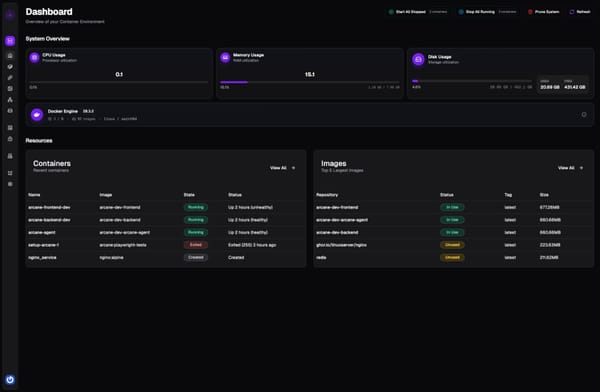
My new favorite. A Modern Docker Management GUI with a clean, intuitive design. The GUI includes: real-time monitoring, container management, image management, network configuration, volume management and resource visualization and the list goes on ...