
Basics
pfSense 2.9.0 on Proxmox
Installing pfSense 2.9.0 on Proxmox. An update for 2026. Including how to setup the GEMU Guest Agent. And Unbound 1.26.0 security issue fix for older installs.

Networking is one of the hardest things in building working clusters of servers. It's also the most vulnerable parts of your hole setup. The WAN interface is under attack 24/7 - by professionals and military.

Basics
Installing pfSense 2.9.0 on Proxmox. An update for 2026. Including how to setup the GEMU Guest Agent. And Unbound 1.26.0 security issue fix for older installs.

Docker
Anyone using computers knows how important the DNS is. For a homelab we need more, things like blocking bad sites. Without a working DNS you are lost and nothing will work. Technitium is a DNS Server for Privacy and Security including site blocking and syncronication. We set it up using Docker.

Networking
Setting up a VM or a VPS is easy. But you need to make it secure, and that is hard. Here we discover 2 of the basic tools UFW and Fail2ban. This post is about setup, making it safe and secure and the results running for a day. This is the first step when setting up a new web facing VM or a VPS.

DNS
To use friendly names instead of IPs. Set up a Private Domain with Technitium. We set up a Domain Name Server ns1 and configure it to handle our domain, example.com or mylab.lan. Options for later: DHCP, a cluster with at least ns1 and ns2 for redundancy, and add ad-blocking if that's needed.

Networking
Running Tailscale is really easy and you can use their Control Center. But, how about total autonomy and self-host the Tailscale Control Center on your own server or a VPS. It is possible, and this post is about setting it all up using Headscale.

Networking
Anyone who do remote work will have the need to start a remote machine at some point in their career. I'm using UpSnap in my Tailscale VM in Docker to perform WoL of some of the Servers. This VM is on an always on server and runs: Portainer, Tailscale and UpSnap.

Networking
No open ports. Global access to your Proxmox and other nodes. Secure VPN communication using Tailscale. Tailscale makes WireGuard mesh networking easy. You can use Tailscale's cloud based Control Center or self-host one - Headscale.

Docker
This post will show the use of the Docker Socket Proxy with Portainer. It allows controlled and secure automation while still maintaining security. It's a reverse proxy that allows you to control what Docker API endpoints can be accessed by Docker clients such as Portainer, DIUN and Watchtower.
MyNewLab
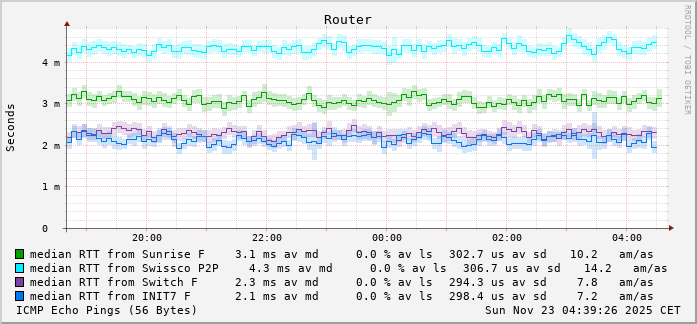
SmokePing is a deluxe latency measurement tool. It can measure, store and display latency, latency distribution and packet loss. SmokePing uses the RRDtool to maintain a long term data-store. It draws informative graphs of the state of each network connection to express up-to-the-minute information.
Networking
Running services on a PVE node is a perfect place to simulate networking. For the basic setup, we are to use SDN and OPNsense. Setting up a virtual or dedicated NIC as WAN and set up an SDN network for our VM/CT to use.

Docker
There are some instances when you need a Windows instance, but you don't need a full VM to do it. You can use a Docker Container for Windows XP – Windows 11 or one of the Windows Severs. Yes, this is possible, and it's a usable system.

Networking
Due to the new kernel recognizing more features of some hardware, like for example virtual functions, and interface naming often derives from the PCI(e) address, some NIC may change their name, in which case the network configuration needs to be adapted.