
Proxmox Markdown Guide
Markdown is a text-to-HTML conversion tool for web writers. It allows you to write using an easy-to-read, easy-to-write plain text format, then convert it to structurally valid XHTML (or HTML). — John Gruber


Markdown
Markdown is a text-to-HTML conversion tool for web writers. It allows you to write using an easy-to-read, easy-to-write plain text format, then convert it to structurally valid XHTML (or HTML).
https://daringfireball.net/projects/markdown/
— John Gruber
The Proxmox VE web interface has support for using Markdown to rendering rich text formatting in node and virtual guest notes.
Proxmox VE supports CommonMark with most extensions of GFM (GitHub Flavored Markdown), like tables or task-lists.
Markdown Basics
Note that we only describe the basics here, please search the web for more extensive resources, for example on https://www.markdownguide.org/
Headings
# This is a Heading h1
## This is a Heading h2
### This is a Heading h3
#### This is a Heading h4
##### This is a Heading h5
Generates:
This is a Heading h1
This is a Heading h2
This is a Heading h3
This is a Heading h4
This is a Heading h5
Emphasis
Use *text* or _text_ for emphasis.
Use **text** or __text__ for bold, heavy-weight text.
Combinations are also possible, for example:
_You **can** combine them_
You can combine them
Links
You can use automatic detection of links, for example, https://forum.proxmox.com/ would transform it into a clickable link.
You can also control the link text, for example:
Now, [the link text](https://forum.proxmox.com/).
Now, [the link text](https://forum.proxmox.com/).Lists
Unordered Lists
Use * or - for unordered lists, for example:
* Item 1
* Item 2
* Item 2a
* Item 2b
Adding an indentation can be used to created nested lists.
Ordered Lists
1. Item 1
1. Item 2
1. Item 3
      1. Item 3a
      1. Item 3b
Output example
- Item 1
- Item 2
- Item 3
- Item 3a
- Item 3b

|
The integer of ordered lists does not need to be correct, they will be numbered automatically. |
Task Lists
Task list use an empty box [ ] for unfinished tasks and a box with an X for finished tasks. For example:
- [X] First task already done!
- [X] Second one too
- [ ] This one is still to-do
- [ ] So is this one
Generates:
- [X] First task already done!
- [X] Second one too
- [ ] This one is still to-do
- [ ] So is this one
Tables – not working in the Notes section
Tables use the pipe symbol | to separate columns, and - to separate the table header from the table body, in that separation one can also set the text alignment, making one column left-, center-, or right-aligned.
| Left columns | Right columns | Some | More | Cols.| Centering Works |
| –--|—--:|--—|—-—|—-—|:—--:|
| left foo | right foo | First | Row | Here | >center< | | left bar | right bar | Second | Row | Here | 123456 | | left baz | right baz | Third | Row | Here | Tested | | left zab | right zab | Fourth | Row | Here | ☁️☁️☁️ | | left rab | right rab | And | Last | Here | The End |
but that can make editing tables easier.
| Left columns | Right columns | Some | More | Cols. | Centering Works Too |
|---|---|---|---|---|---|
| left foo | right foo | First | Row | Here | >center< |
| left bar | right bar | Second | Row | Here | 12345 |
| left baz | right baz | Third | Row | Here | Test |
| left zab | right zab | Fourth | Row | Here | ☁️☁️☁️ |
| left rab | right rab | And | Last | Here | The End |
Block Quotes
You can enter block quotes by prefixing a line with >, similar as in plain-text emails.
> Markdown is a lightweight markup language with a plain-text-formatting syntax, > – created 2004 by John Gruber with Aaron Swartz.
>
>> Markdown is often used to format readme files, for writing messages in online discussion forums,
>> and to create rich text using a plain text editor.
>>>Markdown is a text-to-HTML conversion tool for web writers. It allows you to write using an easy-to-read, easy-to-write plain text format, then convert it to structurally valid XHTML (or HTML). — John Gruber
Markdown is a lightweight markup language with a plain-text-formatting syntax,
– created 2004 by John Gruber with Aaron Swartz.Markdown is often used to format readme files, for writing messages in online discussion forums,
and to create rich text using a plain text editor.Markdown is a text-to-HTML conversion tool for web writers. It allows you to write using an easy-to-read, easy-to-write plain text format, then convert it to structurally valid XHTML (or HTML). — John Gruber
Code and Snippets
You can use backticks to avoid processing for a few word or paragraphs.
That is useful for avoiding that a code or configuration chunk gets mistakenly interpreted as Markdown.
Inline code
Surrounding part of a line with single backticks (`) allows writing code inline, for examples:
This hosts IP address is `10.10.10.1`Whole blocks of code
For code blocks spanning several lines you can use triple-backticks to start and end such a block, for example:
```
# This is the network config I want to remember here
auto vmbr2
iface vmbr2 inet static
address 10.0.0.1/24
bridge-ports ens20
bridge-stp off
bridge-fd 0
bridge-vlan-aware yes
bridge-vids 2-4094
```
```bash
# This is the network config I want to remember here
auto vmbr2
iface vmbr2 inet static
        address 10.0.0.1/24
        bridge-ports ens20
        bridge-stp off
        bridge-fd 0
        bridge-vlan-aware yes
       bridge-vids 2-4094
# This is the network config I want to remember here
auto vmbr2
iface vmbr2 inet static
address 10.0.0.1/24
bridge-ports nic4
bridge-stp off
bridge-fd 0
bridge-vlan-aware yes
bridge-vids 2-4092 Badges
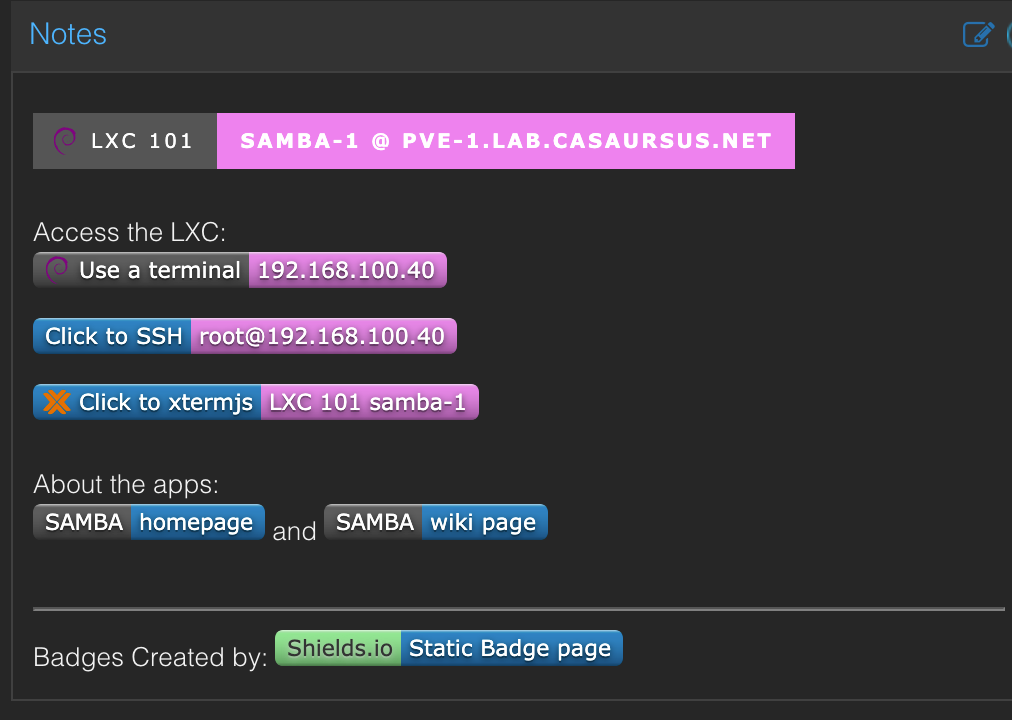
Code needed to generate
[]()<br><br>
Access the LXC:<br>
[]()
[](ssh://[email protected])
[](http://192.168.100.41:8006/?console=lxc&xtermjs=1&vmid=101&vmname=samba-1&node=pve-1&cmd=)<br><br>
About the apps: <br>
[](https://www.samba.org/samba/) and [](https://wiki.samba.org/index.php/Main_Page)<br><br>
---
Badges Created by: [](https://https://img.shields.io/badges/static-badge)
References
Markdown [1] Proxmox docs [2] Badges [3]


