
Server Monitoring with Beszel
Beszel is a lightweight server monitoring platform that includes Proxmox and Docker statistics, historical data, and alert functions. It has a nice web interface, simple configuration, and is ready to use out of the box. It supports automatic backup, multi-user, OAuth authentication, and API access.

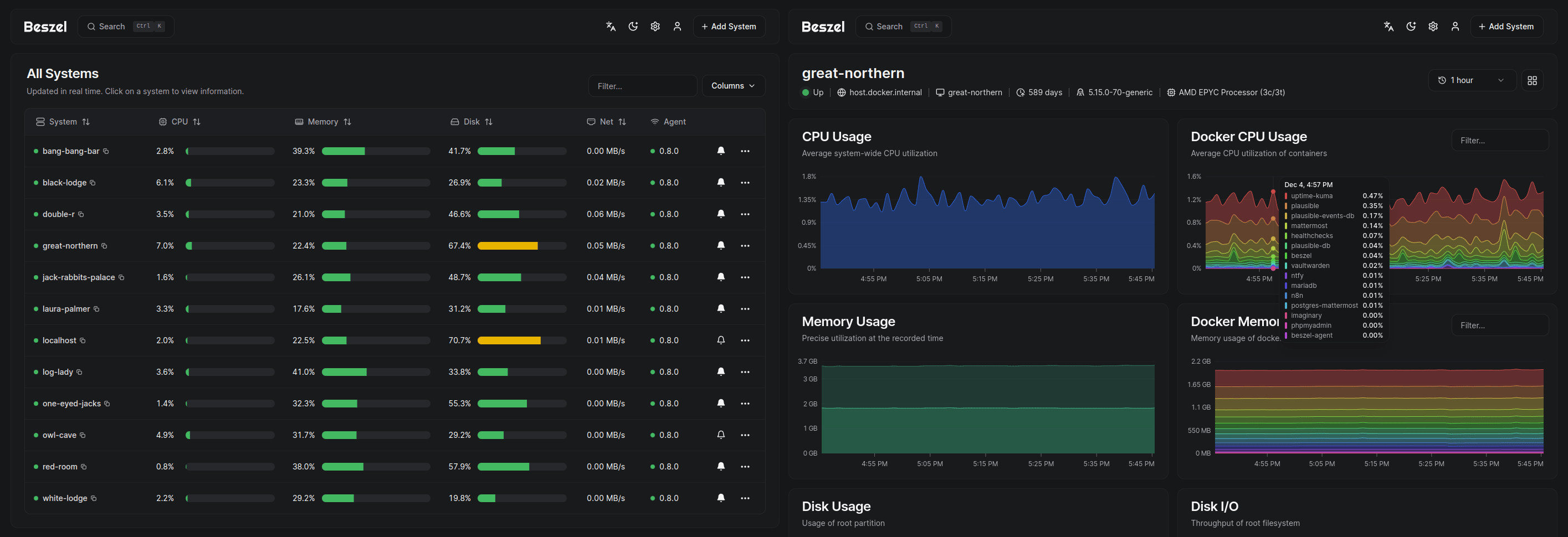
Server monitoring, is your most important task. You should set up monitoring on day one, and you need to constantly follow the stats for changes.
The benefit of Beszel is that it's an easy to install and configure system that can do any Server and also Docker. It has many security features and alert functions.
Beszel
Beszel consists of two main components: the Hub and the Agent.
- The Hub: A web application built on the PocketBase backend that provides a dashboard for viewing and managing the connected systems.
- The Agent: Runs on each system you want to monitor, creating a minimal SSH server to communicate system metrics to the hub. Protected by an SSH key.
Features
- Lightweight: Smaller and less resource-intensive than leading solutions.
- Simple: Easy setup, no need for public internet exposure.
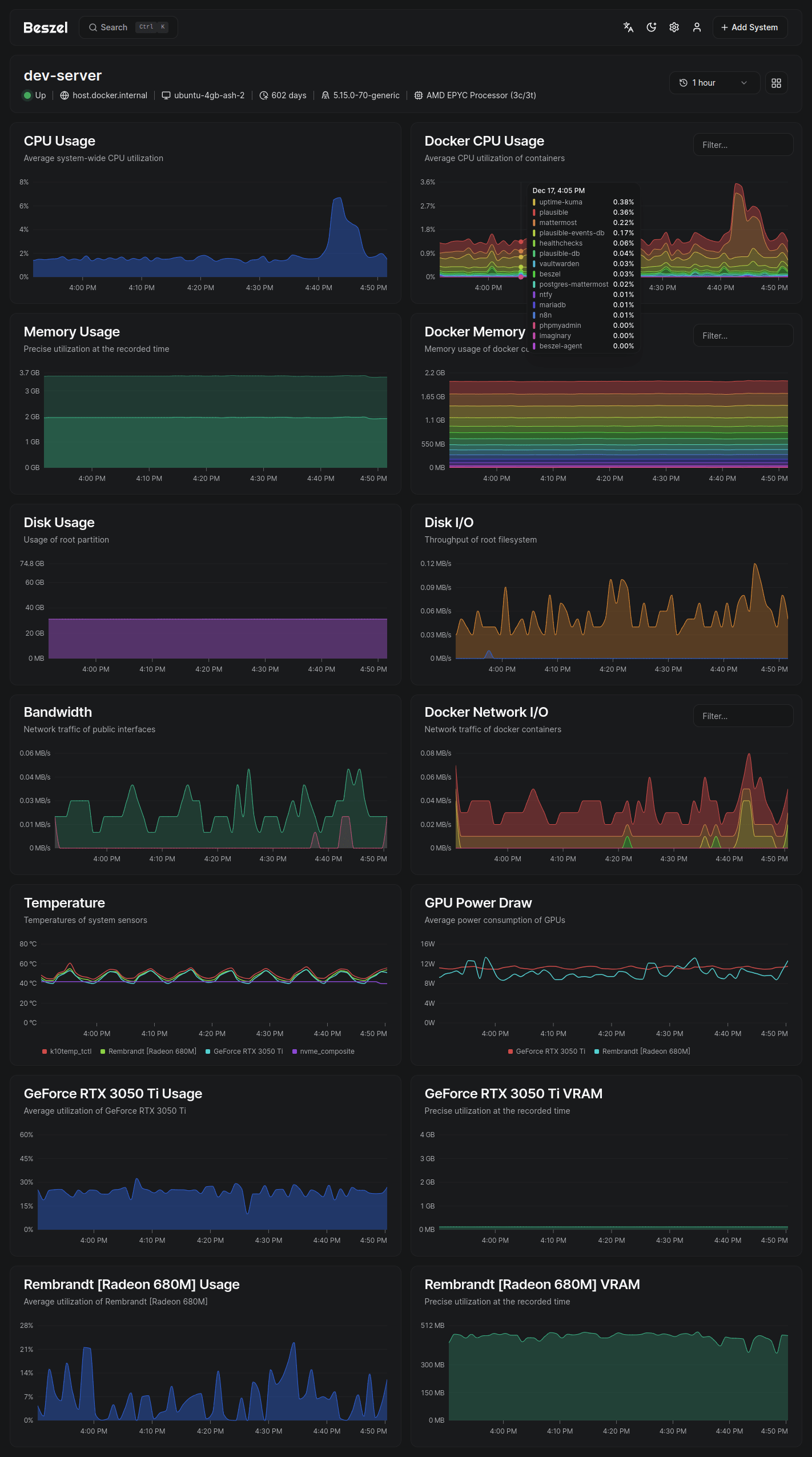
- Docker stats: Tracks CPU, memory, and network usage history for each container.
- Alerts: Configurable alerts for CPU, memory, disk, bandwidth, temperature, and status.
- Multi-user: Users manage their own systems. Admins can share systems across users.
- OAuth / OIDC: Supports many OAuth2 providers. Password auth can be disabled.
- Automatic backups: Save and restore data from disk or S3-compatible storage.
- REST API: Use or update your data in your own scripts and applications.
Supported metrics
- CPU usage - Host system and Docker / Podman containers.
- Memory usage - Host system and containers. Includes swap and ZFS ARC.
- Disk usage - Host system. Supports multiple partitions and devices.
- Disk I/O - Host system. Supports multiple partitions and devices.
- Network usage - Host system and containers.
- Temperature - Host system sensors.
- GPU usage / temperature / power draw - Nvidia and AMD only. Must use binary agent.
Installation
I use it on my test rig, on the Docker VM for checking the stats of things.
The installation is a two phase process.
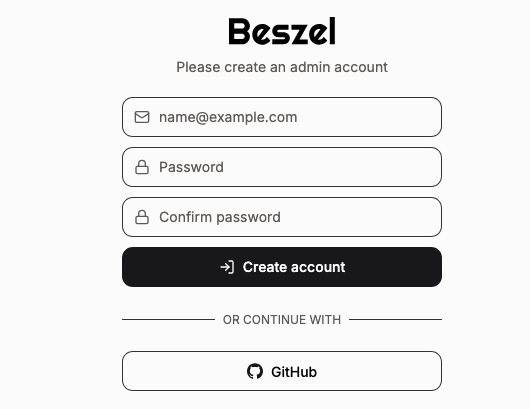
- Initialization and SSH KEY generation using
ssh-keygen -t ed25519 -C "email or name" -f ~/.ssh/beszel- Use any email
[email protected]orBeszelas reference - Password must be at least 8 characters.
- Hit
+ Add Systemto set up Beszel to get the key
- Use any email
- Edit the Docker Compose YAML -file and restart.
Now we get the SSH Key. Note, I did change to Dark Mode.
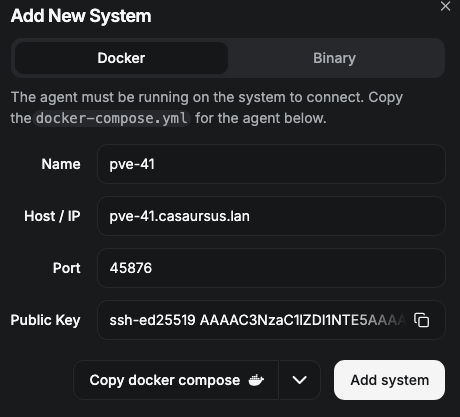
Set up the Hub and Agent
The docker-compose.yml file
services:
  beszel:
    image: henrygd/beszel:latest
    container_name: beszel
    restart: unless-stopped
    ports:
      - 8090:8090
    volumes:
      - ./beszel_data:/beszel_data
      - ./beszel_socket:/beszel_socket

  beszel-agent:
    image: henrygd/beszel-agent:latest
    container_name: beszel-agent
    restart: unless-stopped
    network_mode: host #optional, see info below
    volumes:
      - ./beszel_socket:/beszel_socket
      - /var/run/docker.sock:/var/run/docker.sock:ro
    environment:
      LISTEN: 45876 #/beszel_socket/beszel.sock
      KEY: $KEY
The .env file
# The .env file
# Do not remove quotes around the key
KEY: 'ssh-ed25519 AAAAC3NzaC1lZDI1NTE5AAAA...'The agent must use host network mode to access the host's network interface stats. This automatically exposes the port, so change the port using an environment variable if needed.
Add the Proxmox Servers
All you need is the IP/FQDN of the Server, and then you can use the Hub GUI to generate the needed stuff from the Binary tab, and then you install the agent on your Proxmox server.
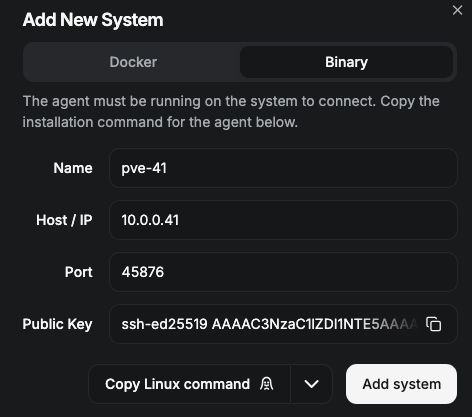
curl -sL https://get.beszel.dev -o /tmp/install-agent.sh && chmod +x /tmp/install-agent.sh && /tmp/install-agent.sh -p 45876 -k "ssh-ed25519 AAAAC3NzaC1lZDI1NTE5AAAA..."Example code with part of the SSH-Key shown
Open a shell on the Proxmox node and insert and run the copied command:
mkdir /opt/beszel
cd /opt/beszel
nano install-agent.sh
Paste the Copied command and close the file.
#!/bin/bash
curl -sL https://get.beszel.dev -o /tmp/install-agent.sh && chmod +x /tmp/install-agent.sh && /tmp/install-agent.sh -p 45876 -k "ssh-ed25519 AAAAC3NzaC1lZDI1NTE5AAAA..."
Example code with part of the SSH-Key shown. Use your port and key!
Make it executable (root only), then run it
chmod 700 install-agent.sh./install-agent.shYou will be prompted for a yes or no answer during the execution:
Would you like to enable automatic daily updates for beszel-agent? (y/n): y
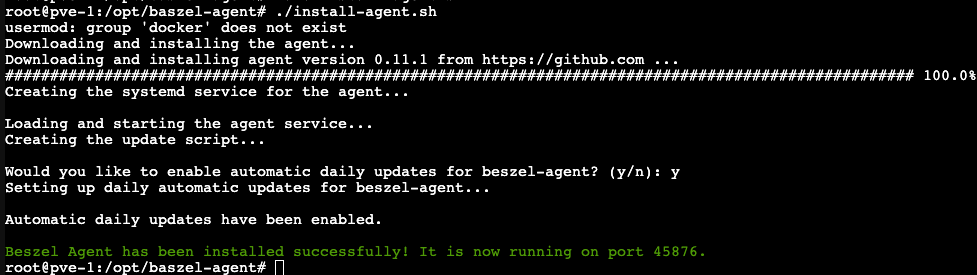
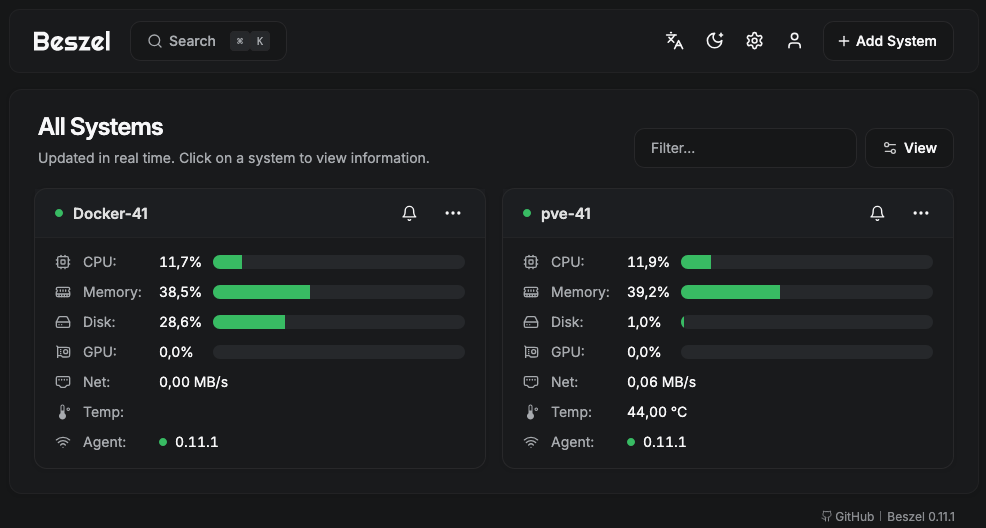
The Beszel in action
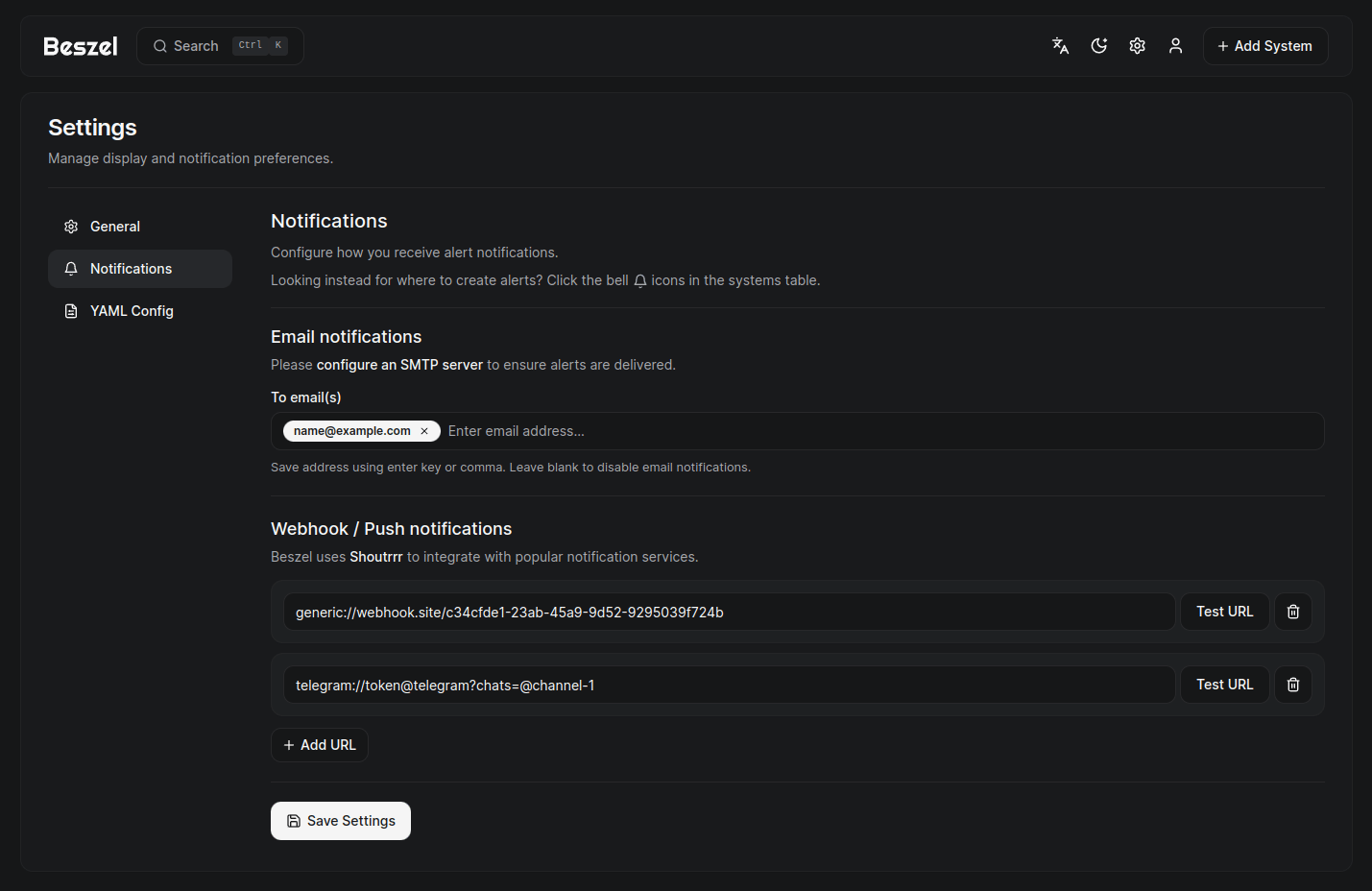
See all setting and configure according to your needs
Creating a service if missing
nano /etc/systemd/system/beszel-agent.service[Unit]
Description=Beszel Agent Service
After=network-online.target
Wants=network-online.target
[Service]
# ExecStart={/path/to/working/directory}/beszel-agent E.g. below
ExecStart=opt/beszel-agent/beszel-agent
Environment="LISTEN=$LISTEN"
Environment="KEY=$KEY"
# Environment="EXTRA_FILESYSTEMS=sdb"
Restart=on-failure
RestartSec=5
StateDirectory=beszel-agent
# Security/sandboxing settings
KeyringMode=private
LockPersonality=yes
NoNewPrivileges=yes
ProtectClock=yes
ProtectHome=read-only
ProtectHostname=yes
ProtectKernelLogs=yes
ProtectSystem=strict
RemoveIPC=yes
RestrictSUIDSGID=true
[Install]
WantedBy=multi-user.targetEnable and start the Beszel service
sudo systemctl daemon-reload
sudo systemctl enable --now beszel-agent.service
The downloaded script used to install the Agent in the script.
Beszel install-agent.sh
!/bin/sh
is_alpine() {
[ -f /etc/alpine-release ]
}
is_openwrt() {
cat /etc/os-release | grep -q "OpenWrt"
}
If SELinux is enabled, set the context of the binary
set_selinux_context() {
Check if SELinux is enabled and in enforcing or permissive mode
if command -v getenforce >/dev/null 2>&1; then
SELINUX_MODE=$(getenforce)
if [ "$SELINUX_MODE" != "Disabled" ]; then
echo "SELinux is enabled (${SELINUX_MODE} mode). Setting appropriate context..."
# First try to set persistent context if semanage is available
if command -v semanage >/dev/null 2>&1; then
echo "Attempting to set persistent SELinux context..."
if semanage fcontext -a -t bin_t "/opt/beszel-agent/beszel-agent" >/dev/null 2>&1; then
restorecon -v /opt/beszel-agent/beszel-agent >/dev/null 2>&1
else
echo "Warning: Failed to set persistent context, falling back to temporary context."
fi
fi
# Fall back to chcon if semanage failed or isn't available
if command -v chcon >/dev/null 2>&1; then
# Set context for both the directory and binary
chcon -t bin_t /opt/beszel-agent/beszel-agent || echo "Warning: Failed to set SELinux context for binary."
chcon -R -t bin_t /opt/beszel-agent || echo "Warning: Failed to set SELinux context for directory."
else
if [ "$SELINUX_MODE" = "Enforcing" ]; then
echo "Warning: SELinux is in enforcing mode but chcon command not found. The service may fail to start."
echo "Consider installing the policycoreutils package or temporarily setting SELinux to permissive mode."
else
echo "Warning: SELinux is in permissive mode but chcon command not found."
fi
fi
fi
fi
}
Clean up SELinux contexts if they were set
cleanup_selinux_context() {
if command -v getenforce >/dev/null 2>&1 && [ "$(getenforce)" != "Disabled" ]; then
echo "Cleaning up SELinux contexts..."
# Remove persistent context if semanage is available
if command -v semanage >/dev/null 2>&1; then
semanage fcontext -d "/opt/beszel-agent/beszel-agent" 2>/dev/null || true
fi
fi
}
Ensure the proxy URL ends with a /
ensure_trailing_slash() {
if [ -n "$1" ]; then
case "$1" in
*/) echo "$1" ;;
*) echo "$1/" ;;
esac
else
echo "$1"
fi
}
Default values
PORT=45876
UNINSTALL=false
GITHUB_URL="https://github.com"
GITHUB_API_URL="https://api.github.com" # not blocked in China currently
GITHUB_PROXY_URL=""
KEY=""
AUTO_UPDATE_FLAG="" # empty string means prompt, "true" means auto-enable, "false" means skip
Check for help flag
case "$1" in
-h | --help)
printf "Beszel Agent installation script\n\n"
printf "Usage: ./install-agent.sh [options]\n\n"
printf "Options: \n"
printf " -k : SSH key (required, or interactive if not provided)\n"
printf " -p : Port (default: $PORT)\n"
printf " -u : Uninstall Beszel Agent\n"
printf " --auto-update [VALUE] : Control automatic daily updates\n"
printf " VALUE can be true (enable) or false (disable). If not specified, will prompt.\n"
printf " --china-mirrors [URL] : Use GitHub proxy to resolve network timeout issues in mainland China\n"
printf " URL: optional custom proxy URL (default: https://gh.beszel.dev)\n"
printf " -h, --help : Display this help message\n"
exit 0
;;
esac
Build sudo args by properly quoting everything
build_sudo_args() {
QUOTED_ARGS=""
while [ $# -gt 0 ]; do
if [ -n "$QUOTED_ARGS" ]; then
QUOTED_ARGS="$QUOTED_ARGS "
fi
QUOTED_ARGS="$QUOTED_ARGS'$(echo "$1" | sed "s/'/'\\''/g")'"
shift
done
echo "$QUOTED_ARGS"
}
Check if running as root and re-execute with sudo if needed
if [ "$(id -u)" != "0" ]; then
if command -v sudo >/dev/null 2>&1; then
SUDO_ARGS=$(build_sudo_args "$@")
eval "exec sudo $0 $SUDO_ARGS"
else
echo "This script must be run as root. Please either:"
echo "1. Run this script as root (su root)"
echo "2. Install sudo and run with sudo"
exit 1
fi
fi
Parse arguments
while [ $# -gt 0 ]; do
case "$1" in
-k)
shift
KEY="$1"
;;
-p)
shift
PORT="$1"
;;
-u)
UNINSTALL=true
;;
--china-mirrors*)
# Check if there's a value after the = sign
if echo "$1" | grep -q "="; then
# Extract the value after =
CUSTOM_PROXY=$(echo "$1" | cut -d'=' -f2)
if [ -n "$CUSTOM_PROXY" ]; then
GITHUB_PROXY_URL="$CUSTOM_PROXY"
GITHUB_URL="$(ensure_trailing_slash "$CUSTOM_PROXY")https://github.com"
else
GITHUB_PROXY_URL="https://gh.beszel.dev"
GITHUB_URL="$GITHUB_PROXY_URL"
fi
elif [ "$2" != "" ] && ! echo "$2" | grep -q '^-'; then
# use custom proxy URL provided as next argument
GITHUB_PROXY_URL="$2"
GITHUB_URL="$(ensure_trailing_slash "$2")https://github.com"
shift
else
# No value specified, use default
GITHUB_PROXY_URL="https://gh.beszel.dev"
GITHUB_URL="$GITHUB_PROXY_URL"
fi
;;
--auto-update*)
# Check if there's a value after the = sign
if echo "$1" | grep -q "="; then
# Extract the value after =
AUTO_UPDATE_VALUE=$(echo "$1" | cut -d'=' -f2)
if [ "$AUTO_UPDATE_VALUE" = "true" ]; then
AUTO_UPDATE_FLAG="true"
elif [ "$AUTO_UPDATE_VALUE" = "false" ]; then
AUTO_UPDATE_FLAG="false"
else
echo "Invalid value for --auto-update flag: $AUTO_UPDATE_VALUE. Using default (prompt)."
fi
elif [ "$2" = "true" ] || [ "$2" = "false" ]; then
# Value provided as next argument
AUTO_UPDATE_FLAG="$2"
shift
else
# No value specified, use true
AUTO_UPDATE_FLAG="true"
fi
;;
*)
echo "Invalid option: $1" >&2
exit 1
;;
esac
shift
done
Uninstall process
if [ "$UNINSTALL" = true ]; then
Clean up SELinux contexts before removing files
cleanup_selinux_context
if is_alpine; then
echo "Stopping and disabling the agent service..."
rc-service beszel-agent stop
rc-update del beszel-agent default
echo "Removing the OpenRC service files..."
rm -f /etc/init.d/beszel-agent
# Remove the update service if it exists
echo "Removing the daily update service..."
rc-service beszel-agent-update stop 2>/dev/null
rc-update del beszel-agent-update default 2>/dev/null
rm -f /etc/init.d/beszel-agent-update
# Remove log files
echo "Removing log files..."
rm -f /var/log/beszel-agent.log /var/log/beszel-agent.err
elif is_openwrt; then
echo "Stopping and disabling the agent service..."
service beszel-agent stop
service beszel-agent disable
echo "Removing the OpenWRT service files..."
rm -f /etc/init.d/beszel-agent
# Remove the update service if it exists
echo "Removing the daily update service..."
rm -f /etc/crontabs/beszel
else
echo "Stopping and disabling the agent service..."
systemctl stop beszel-agent.service
systemctl disable beszel-agent.service
echo "Removing the systemd service file..."
rm /etc/systemd/system/beszel-agent.service
# Remove the update timer and service if they exist
echo "Removing the daily update service and timer..."
systemctl stop beszel-agent-update.timer 2>/dev/null
systemctl disable beszel-agent-update.timer 2>/dev/null
rm -f /etc/systemd/system/beszel-agent-update.service
rm -f /etc/systemd/system/beszel-agent-update.timer
systemctl daemon-reload
fi
echo "Removing the Beszel Agent directory..."
rm -rf /opt/beszel-agent
echo "Removing the dedicated user for the agent service..."
killall beszel-agent 2>/dev/null
if is_alpine || is_openwrt; then
deluser beszel 2>/dev/null
else
userdel beszel 2>/dev/null
fi
echo "Beszel Agent has been uninstalled successfully!"
exit 0
fi
Confirm the use of GitHub mirrors for downloads
if [ -n "$GITHUB_PROXY_URL" ]; then
printf "\nConfirm use of GitHub mirror (%s) for downloading beszel-agent?\nThis helps to install properly in mainland China. (Y/n): " "$GITHUB_PROXY_URL"
read USE_MIRROR
USE_MIRROR=${USE_MIRROR:-Y}
if [ "$USE_MIRROR" = "Y" ] || [ "$USE_MIRROR" = "y" ]; then
echo "Using GitHub Mirror ($GITHUB_PROXY_URL) for downloads..."
else
GITHUB_URL="https://github.com"
fi
fi
Check if a package is installed
package_installed() {
command -v "$1" >/dev/null 2>&1
}
Check for package manager and install necessary packages if not installed
if is_alpine; then
if ! package_installed tar || ! package_installed curl || ! package_installed coreutils; then
apk update
apk add tar curl coreutils shadow
fi
elif is_openwrt; then
if ! package_installed tar || ! package_installed curl || ! package_installed coreutils; then
opkg update
opkg install tar curl coreutils
fi
elif package_installed apt-get; then
if ! package_installed tar || ! package_installed curl || ! package_installed sha256sum; then
apt-get update
apt-get install -y tar curl coreutils
fi
elif package_installed yum; then
if ! package_installed tar || ! package_installed curl || ! package_installed sha256sum; then
yum install -y tar curl coreutils
fi
elif package_installed pacman; then
if ! package_installed tar || ! package_installed curl || ! package_installed sha256sum; then
pacman -Sy --noconfirm tar curl coreutils
fi
else
echo "Warning: Please ensure 'tar' and 'curl' and 'sha256sum (coreutils)' are installed."
fi
If no SSH key is provided, ask for the SSH key interactively
if [ -z "$KEY" ]; then
printf "Enter your SSH key: "
read KEY
fi
Verify checksum
if command -v sha256sum >/dev/null; then
CHECK_CMD="sha256sum"
elif command -v md5 >/dev/null; then
CHECK_CMD="md5 -q"
else
echo "No MD5 checksum utility found"
exit 1
fi
Create a dedicated user for the service if it doesn't exist
if is_alpine; then
if ! id -u beszel >/dev/null 2>&1; then
echo "Creating a dedicated user for the Beszel Agent service..."
adduser -D -H -s /sbin/nologin beszel
fi
Add the user to the docker group to allow access to the Docker socket
addgroup beszel docker
else
if ! id -u beszel >/dev/null 2>&1; then
echo "Creating a dedicated user for the Beszel Agent service..."
useradd -M -s /bin/false beszel
fi
Add the user to the docker group to allow access to the Docker socket
usermod -aG docker beszel
fi
Create the directory for the Beszel Agent
if [ ! -d "/opt/beszel-agent" ]; then
echo "Creating the directory for the Beszel Agent..."
mkdir -p /opt/beszel-agent
chown beszel:beszel /opt/beszel-agent
chmod 755 /opt/beszel-agent
fi
Download and install the Beszel Agent
echo "Downloading and installing the agent..."
OS=$(uname -s | sed -e 'y/ABCDEFGHIJKLMNOPQRSTUVWXYZ/abcdefghijklmnopqrstuvwxyz/')
ARCH=$(uname -m | sed -e 's/x86_64/amd64/' -e 's/armv6l/arm/' -e 's/armv7l/arm/' -e 's/aarch64/arm64/')
FILE_NAME="beszel-agent_${OS}_${ARCH}.tar.gz"
LATEST_VERSION=$(curl -s "$GITHUB_API_URL""/repos/henrygd/beszel/releases/latest" | grep -o '"tag_name": "v[^"]*"' | cut -d'"' -f4 | tr -d 'v')
if [ -z "$LATEST_VERSION" ]; then
echo "Failed to get latest version"
exit 1
fi
echo "Downloading and installing agent version ${LATEST_VERSION} from ${GITHUB_URL} ..."
Download checksums file
TEMP_DIR=$(mktemp -d)
cd "$TEMP_DIR" || exit 1
CHECKSUM=$(curl -sL "$GITHUB_URL/henrygd/beszel/releases/download/v${LATEST_VERSION}/beszel_${LATEST_VERSION}_checksums.txt" | grep "$FILE_NAME" | cut -d' ' -f1)
if [ -z "$CHECKSUM" ] || ! echo "$CHECKSUM" | grep -qE "[1]{64}$"; then
echo "Failed to get checksum or invalid checksum format"
exit 1
fi
if ! curl -#L "$GITHUB_URL/henrygd/beszel/releases/download/v${LATEST_VERSION}/$FILE_NAME" -o "$FILE_NAME"; then
echo "Failed to download the agent from ""$GITHUB_URL/henrygd/beszel/releases/download/v${LATEST_VERSION}/$FILE_NAME"
rm -rf "$TEMP_DIR"
exit 1
fi
if [ "$($CHECK_CMD "$FILE_NAME" | cut -d' ' -f1)" != "$CHECKSUM" ]; then
echo "Checksum verification failed: $($CHECK_CMD "$FILE_NAME" | cut -d' ' -f1) & $CHECKSUM"
rm -rf "$TEMP_DIR"
exit 1
fi
if ! tar -xzf "$FILE_NAME" beszel-agent; then
echo "Failed to extract the agent"
rm -rf "$TEMP_DIR"
exit 1
fi
mv beszel-agent /opt/beszel-agent/beszel-agent
chown beszel:beszel /opt/beszel-agent/beszel-agent
chmod 755 /opt/beszel-agent/beszel-agent
Set SELinux context if needed
set_selinux_context
Cleanup
rm -rf "$TEMP_DIR"
Check for NVIDIA GPUs and grant device permissions for systemd service
detect_nvidia_devices() {
local devices=""
for i in /dev/nvidia*; do
if [ -e "$i" ]; then
devices="${devices}DeviceAllow=$i rw\n"
fi
done
echo "$devices"
}
Modify service installation part, add Alpine check before systemd service creation
if is_alpine; then
echo "Creating OpenRC service for Alpine Linux..."
cat >/etc/init.d/beszel-agent <<EOF
!/sbin/openrc-run
name="beszel-agent"
description="Beszel Agent Service"
command="/opt/beszel-agent/beszel-agent"
command_user="beszel"
command_background="yes"
pidfile="/run/${RC_SVCNAME}.pid"
output_log="/var/log/beszel-agent.log"
error_log="/var/log/beszel-agent.err"
start_pre() {
checkpath -f -m 0644 -o beszel:beszel "$output_log" "$error_log"
}
export PORT="$PORT"
export KEY="$KEY"
depend() {
need net
after firewall
}
EOF
chmod +x /etc/init.d/beszel-agent
rc-update add beszel-agent default
Create log files with proper permissions
touch /var/log/beszel-agent.log /var/log/beszel-agent.err
chown beszel:beszel /var/log/beszel-agent.log /var/log/beszel-agent.err
Start the service
rc-service beszel-agent restart
Check if service started successfully
sleep 2
if ! rc-service beszel-agent status | grep -q "started"; then
echo "Error: The Beszel Agent service failed to start. Checking logs..."
tail -n 20 /var/log/beszel-agent.err
exit 1
fi
Auto-update service for Alpine
if [ "$AUTO_UPDATE_FLAG" = "true" ]; then
AUTO_UPDATE="y"
elif [ "$AUTO_UPDATE_FLAG" = "false" ]; then
AUTO_UPDATE="n"
else
printf "\nWould you like to enable automatic daily updates for beszel-agent? (y/n): "
read AUTO_UPDATE
fi
case "$AUTO_UPDATE" in
[Yy]*)
echo "Setting up daily automatic updates for beszel-agent..."
cat >/etc/init.d/beszel-agent-update <<EOF
!/sbin/openrc-run
name="beszel-agent-update"
description="Update beszel-agent if needed"
depend() {
need beszel-agent
}
start() {
ebegin "Checking for beszel-agent updates"
if /opt/beszel-agent/beszel-agent update | grep -q "Successfully updated"; then
rc-service beszel-agent restart
fi
eend $?
}
EOF
chmod +x /etc/init.d/beszel-agent-update
rc-update add beszel-agent-update default
rc-service beszel-agent-update start
printf "\nAutomatic daily updates have been enabled.\n"
;;
esac
Check service status
if ! rc-service beszel-agent status >/dev/null 2>&1; then
echo "Error: The Beszel Agent service is not running."
rc-service beszel-agent status
exit 1
fi
elif is_openwrt; then
echo "Creating procd init script service for OpenWRT..."
cat >/etc/init.d/beszel-agent <<EOF
!/bin/sh /etc/rc.common
USE_PROCD=1
START=99
start_service() {
procd_open_instance
procd_set_param command /opt/beszel-agent/beszel-agent
procd_set_param user beszel
procd_set_param pidfile /var/run/beszel-agent.pid
procd_set_param env PORT="$PORT"
procd_set_param env KEY="$KEY"
procd_set_param stdout 1
procd_set_param stderr 1
procd_close_instance
}
stop_service() {
killall beszel-agent
}
Extra command to trigger agent update
EXTRA_COMMANDS="update"
EXTRA_HELP=" update Update the Beszel agent"
update() {
if /opt/beszel-agent/beszel-agent update | grep -q "Successfully updated"; then
start_service
fi
}
EOF
Enable the service
chmod +x /etc/init.d/beszel-agent
service beszel-agent enable
Start the service
service beszel-agent restart
Auto-update service for OpenWRT using a crontab job
if [ "$AUTO_UPDATE_FLAG" = "true" ]; then
AUTO_UPDATE="y"
sleep 1 # give time for the service to start
elif [ "$AUTO_UPDATE_FLAG" = "false" ]; then
AUTO_UPDATE="n"
sleep 1 # give time for the service to start
else
printf "\nWould you like to enable automatic daily updates for beszel-agent? (y/n): "
read AUTO_UPDATE
fi
case "$AUTO_UPDATE" in
[Yy]*)
echo "Setting up daily automatic updates for beszel-agent..."
cat >/etc/crontabs/beszel <<EOF
0 0 * * * /etc/init.d/beszel-agent update
EOF
/etc/init.d/cron restart
printf "\nAutomatic daily updates have been enabled.\n"
;;
esac
Check service status
if ! service beszel-agent running >/dev/null 2>&1; then
echo "Error: The Beszel Agent service is not running."
service beszel-agent status
exit 1
fi
else
Original systemd service installation code
echo "Creating the systemd service for the agent..."
Detect NVIDIA devices and grant device permissions
NVIDIA_DEVICES=$(detect_nvidia_devices)
cat >/etc/systemd/system/beszel-agent.service <<EOF
[Unit]
Description=Beszel Agent Service
Wants=network-online.target
After=network-online.target
[Service]
Environment="PORT=$PORT"
Environment="KEY=$KEY"
Environment="EXTRA_FILESYSTEMS=sdb"
ExecStart=/opt/beszel-agent/beszel-agent
User=beszel
Restart=on-failure
RestartSec=5
StateDirectory=beszel-agent
Security/sandboxing settings
KeyringMode=private
LockPersonality=yes
NoNewPrivileges=yes
ProtectClock=yes
ProtectHome=read-only
ProtectHostname=yes
ProtectKernelLogs=yes
ProtectSystem=strict
RemoveIPC=yes
RestrictSUIDSGID=true
SystemCallArchitectures=native
$(if [ -n "$NVIDIA_DEVICES" ]; then printf "%b" "# NVIDIA device permissions\n${NVIDIA_DEVICES}"; fi)
[Install]
WantedBy=multi-user.target
EOF
Load and start the service
printf "\nLoading and starting the agent service...\n"
systemctl daemon-reload
systemctl enable beszel-agent.service
systemctl start beszel-agent.service
Create the update script
echo "Creating the update script..."
cat >/opt/beszel-agent/run-update.sh <<'EOF'
!/bin/sh
set -e
if /opt/beszel-agent/beszel-agent update | grep -q "Successfully updated"; then
echo "Update found, checking SELinux context."
if command -v getenforce >/dev/null 2>&1 && [ "$(getenforce)" != "Disabled" ]; then
echo "SELinux enabled, applying context..."
if command -v chcon >/dev/null 2>&1; then
chcon -t bin_t /opt/beszel-agent/beszel-agent || echo "Warning: chcon command failed to apply context."
fi
if command -v restorecon >/dev/null 2>&1; then
restorecon -v /opt/beszel-agent/beszel-agent >/dev/null 2>&1 || echo "Warning: restorecon command failed to apply context."
fi
fi
echo "Restarting beszel-agent service..."
systemctl restart beszel-agent
echo "Update process finished."
else
echo "No updates found or applied."
fi
exit 0
EOF
chown root:root /opt/beszel-agent/run-update.sh
chmod +x /opt/beszel-agent/run-update.sh
Prompt for auto-update setup
if [ "$AUTO_UPDATE_FLAG" = "true" ]; then
AUTO_UPDATE="y"
sleep 1 # give time for the service to start
elif [ "$AUTO_UPDATE_FLAG" = "false" ]; then
AUTO_UPDATE="n"
sleep 1 # give time for the service to start
else
printf "\nWould you like to enable automatic daily updates for beszel-agent? (y/n): "
read AUTO_UPDATE
fi
case "$AUTO_UPDATE" in
[Yy]*)
echo "Setting up daily automatic updates for beszel-agent..."
# Create systemd service for the daily update
cat >/etc/systemd/system/beszel-agent-update.service <<EOF
[Unit]
Description=Update beszel-agent if needed
Wants=beszel-agent.service
[Service]
Type=oneshot
ExecStart=/opt/beszel-agent/run-update.sh
EOF
# Create systemd timer for the daily update
cat >/etc/systemd/system/beszel-agent-update.timer <<EOF
[Unit]
Description=Run beszel-agent update daily
[Timer]
OnCalendar=daily
Persistent=true
RandomizedDelaySec=4h
[Install]
WantedBy=timers.target
EOF
systemctl daemon-reload
systemctl enable --now beszel-agent-update.timer
printf "\nAutomatic daily updates have been enabled.\n"
;;
esac
Wait for the service to start or fail
if [ "$(systemctl is-active beszel-agent.service)" != "active" ]; then
echo "Error: The Beszel Agent service is not running."
echo "$(systemctl status beszel-agent.service)"
exit 1
fi
fi
printf "\n\033[32mBeszel Agent has been installed successfully! It is now running on port $PORT.\033[0m\n"
root@pve-1:/opt/baszel-agent#
- a-fA-F0-9 ↩︎
References
Beszel [1] PocketBase [2] Other posts [3]
Older possts on monitoring Monitoring your Servers, Monitoring Servers with graphs, Monitoring using Nagios, Monitoring, Proxmox Monitoring, How do your apps run, S.M.A.R.T. GUI ↩︎


