
Ricing the SSH Shell prompt
For late night SSH into servers. Make a bright welcome and a clear indication of Node, Cluster and IP. It will also be shown in the Proxmox Shell. Figurine is using the FIGlet fonts, but now with neon colors.

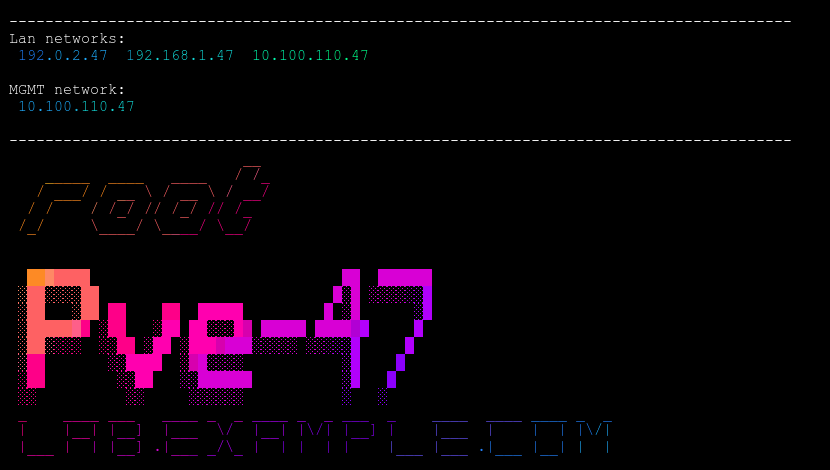
See the GitHub page (see references) to see how to install. Remember to check the code. Don't install before you checked the code and feel safe.
Why do this exist
Many years ago, a tiered night shift IT engineer needed to perform a customer requested change to a specific server at 2 AM. Supporting hundreds of servers for a hundred customers is a lot to remember.
Long story short, he did a perfect job, but on the wrong server.
After, a not so nice call from the VP in charge of IT purchases, I requested our support manager to make something that prevents shit like this. The quick KISS solution was to use FIGlet fonts to enter Server name, internal IP and Customer name into motd.
Examples, figurine -f big "db10.example.com"
Using FIGlet
Message Of The Day method
Install FIGlet apt install figlet and create the message of the day (motd)
######################################
This is a test CT for non-serious use!
######################################
Add a file nano /etc/update-motd.d/05-ip with this hostname -I | figlet
Using a script in the /etc/profile.d
Create the script nano /etc/profile.d/ip.sh
echo ""
echo ".----------------------------------------."
echo "| This is a test CT for non-serious use! |"
echo "'----------------------------------------'"
echo ""
hostname -I | figlet
echo ""
Set your font by the -f flag
Now with Neon Colors
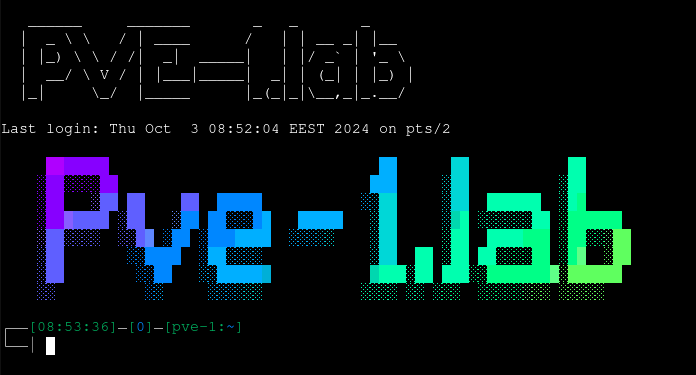
You can download the latest binary from here, or you can compile from source:
go install github.com/arsham/figurine@latestYou need to have the GO compiler installed
Using the ready compiled binary
Download, from the author's GitHub, the figurine binary and extract it to a directory by tar -xvzf figurine_linux_amd64_v1.3.0.tar.gz and cd deploy. Now you can copy it to the servers.
Today, I have it on all Debian/Ubuntu Servers, like Proxmox.
I don't usually have it on VM's, but the size of the binary isn't big.
Usually I create the needed text withfigurineorFIGleton my PC and then copy the ready-made over to the VM.
Copy the executable, figurine to /usr/local/bin of the node.
scp figurine [email protected]:/usr/local/binCreate the SSH login message on your PC
#!/bin/bash
# Fonts liked starwars, Nancyj, Stampranello, Contessa, Contrast, Shadow
#clear # Skip the default Debian Copyright and Warranty text
echo
echo "---------------------------------------------------------------------------------------"
echo "Lan networks: "
/usr/local/bin/figurine -f "Term.flf" "$(hostname -I)" #LAN IP
echo ""
echo "MGMT network: "
/usr/local/bin/figurine -f "Term.flf" "10.10.10.43" #MGMT IP
echo ""
echo "---------------------------------------------------------------------------------------"
#echo ""
/usr/local/bin/figurine -f "Slant.flf" " $USER "
echo ""
echo ""
/usr/local/bin/figurine -f "3d.flf" " $(hostname -a) "
/usr/local/bin/figurine -f "Cybermedium.flf" " $(hostname -d) "
echo ""
Or copy the script from your PC into /etc/profile.d/
scp figurine.sh [email protected]:/etc/profile.d Or edit it on the node nano /etc/profile.d/post.sh
Set the privileges for post.sh
- Only for root logins:
chmod 600 /etc/profile.d/post.sh - Show to everyone
chmod 644 /etc/profile.d/post.sh.
– show only to root, set the privileges to 600
– show everybody else, set privileges to 204
Commands and flags
- List of fonts
figurine -l --list - List of fonts and samples
figurine -ls --list --sample - List samples with your text
figurine -ls Sample Text - To set a font
figurine -f "Poison.flf" This is Text - Help
figurine -h
This application is very lightweight, so feel free to add it to your .zshrc or .bashrc file, so each time you open a new shell it shows you a nice message.
How to use hostname -flags
hostname -areturns the alias name of the host system (if any).- returns an empty line if no alias name is set
- enumerates all configured addresses on all network interfaces
hostname -Areturns all FQDNs of the host- enumerates all configured addresses on all network interfaces
hostname -bis used to always set a hostname, default used if none specifiedhostname -dreturns the Domain if local domains are set- will not return anything (not even a blank line) if no local domain is set
hostname -freturns the FQDN. It contains short hostname and DNS domain name.hostname -Fis used to set the hostname specified in a file (only by root or sudo user)hostname -ireturns the IP addresses, only if the hostname is resolvable.hostname -Ireturns all IP addresses, doesn’t depend on resolvability of hostname.hostname -sreturns the hostname in short.
References
FIGlet started as newban, 1991 and became FIGlet 2.0 1993.
Latest stable releases is 2.2.5 31 May 2012 FTP, fonts FTP
FIGlet [1] Figurine [2] rfiglet [3]


